✍️ How To Start A Blog For Beginners
Starting a blog might seem overwhelming at first. I remember feeling a bit lost when I first decided to share my thoughts online. This guide is built from that experience, showing you exactly what steps to take.
You absolutely can build your own space on the internet. Let’s make it happen together.
Quick Overview
This guide will walk you through setting up your very first blog. You’ll choose a topic, pick a platform, and get your site ready for your amazing content. By the end, you’ll have a functional blog ready for your first post.
- Time needed: 2-4 hours for initial setup
- Difficulty: Beginner
- What you’ll need: A computer, internet access, a credit card for hosting
Step-by-Step Instructions
Step 1: Define Your Niche and Audience
Before anything else, think about what you want to write about. Your blog needs a clear focus to attract the right readers. What topics genuinely excite you?
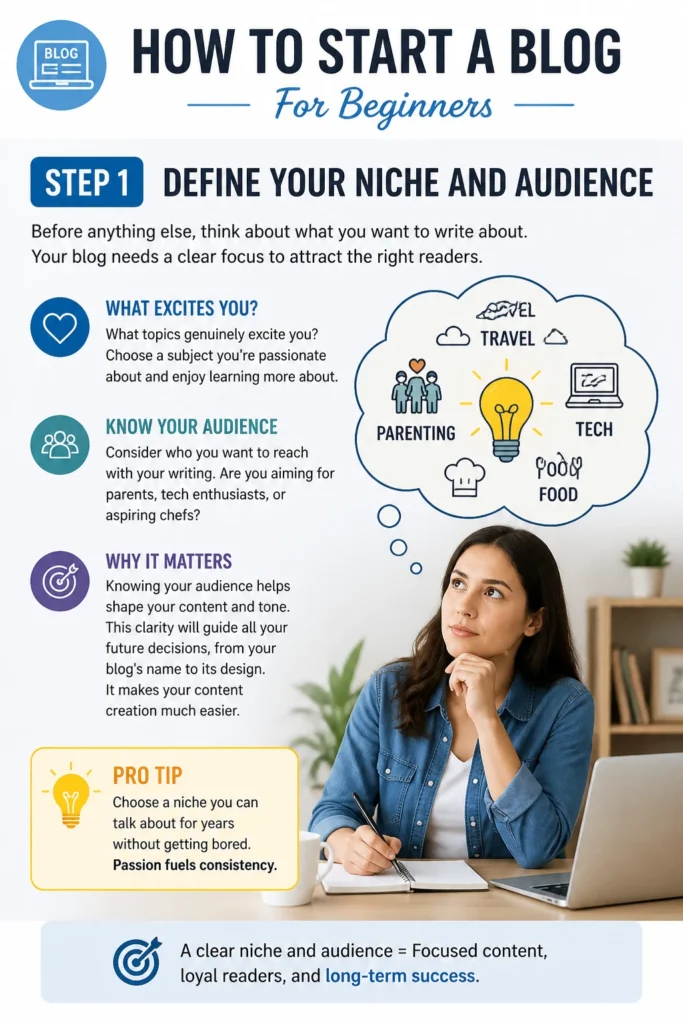
Consider who you want to reach with your writing. Are you aiming for parents, tech enthusiasts, or aspiring chefs? Knowing your audience helps shape your content and tone.
This clarity will guide all your future decisions, from your blog’s name to its design. It makes your content creation much easier.
Pro Tip: Choose a niche you can talk about for years without getting bored. Passion fuels consistency.
Step 2: Choose Your Blogging Platform
Several platforms exist for blogging, but for beginners, WordPress.org is the industry standard. It offers incredible flexibility and ownership. While it requires a bit more setup than free platforms, it’s worth it.
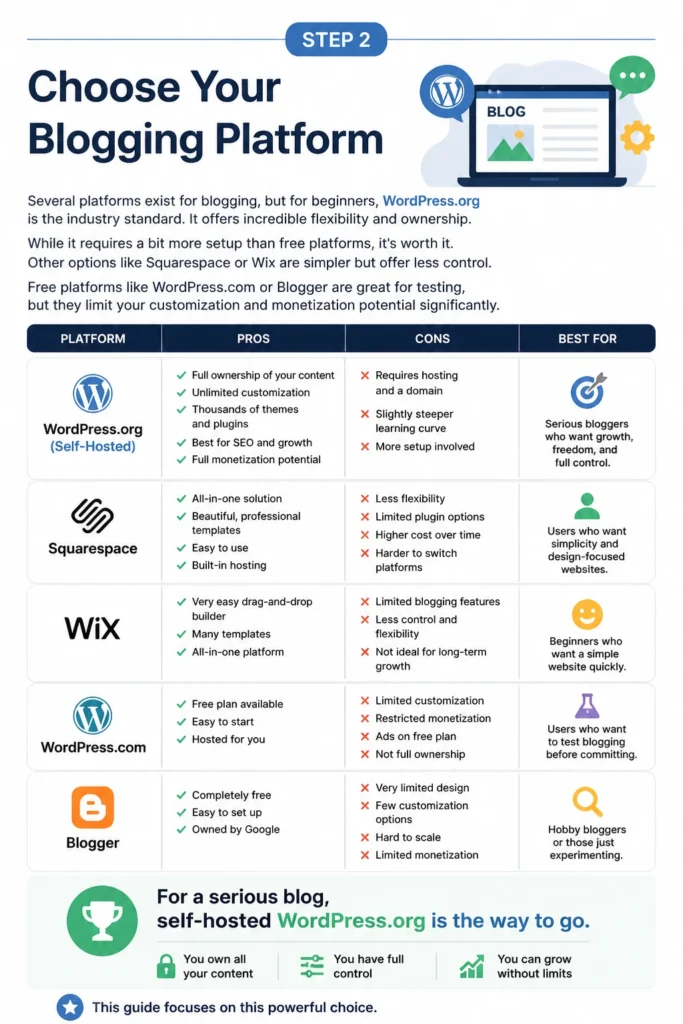
Other options like Squarespace or Wix are simpler but offer less control. Free platforms like WordPress.com or Blogger are great for testing, but they limit your customization and monetization potential significantly.
For a serious blog, self-hosted WordPress.org is the way to go. You own all your content and have full control. This guide focuses on this powerful choice.
Step 3: Pick a Domain Name and Web Host
Your domain name is your blog’s address on the internet (e.g., yourblog.com). Choose something memorable, relevant to your niche, and easy to spell. Try to keep it short if possible.
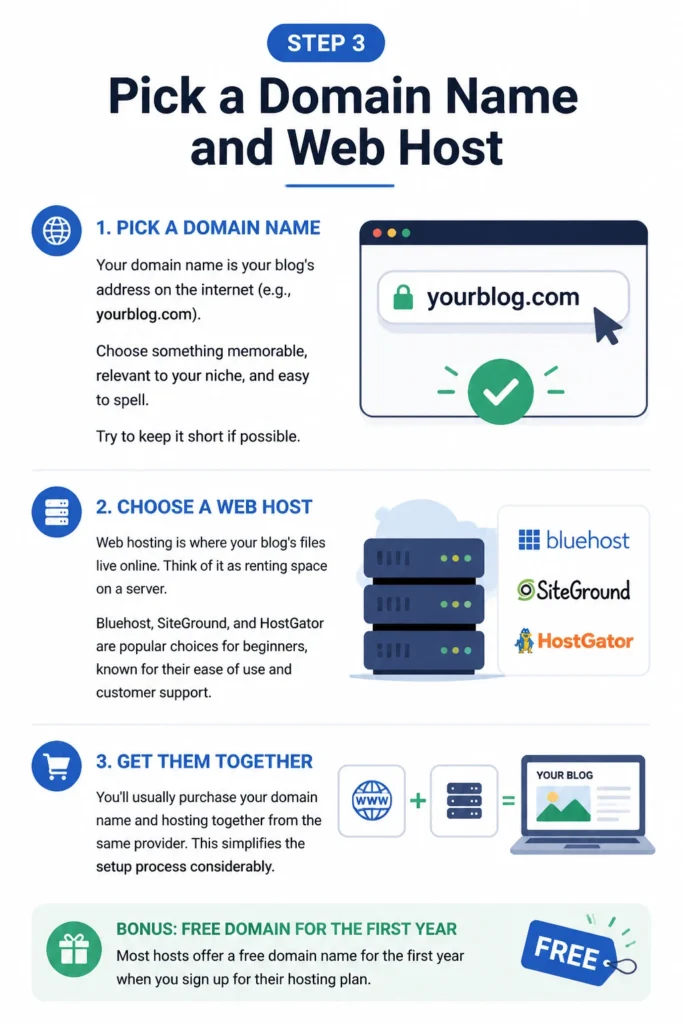
Web hosting is where your blog’s files live online. Think of it as renting space on a server. Bluehost, SiteGround, and HostGator are popular choices for beginners, known for their ease of use and customer support.
You’ll usually purchase your domain name and hosting together from the same provider. This simplifies the setup process considerably. Most hosts offer a free domain name for the first year when you sign up for their hosting plan.
Step 4: Install WordPress
Once you’ve signed up for hosting, the next step is to install WordPress. Most hosting providers offer a one-click WordPress installation process. This makes it incredibly easy, even if you have no technical background.

Log in to your hosting account’s control panel, often called cPanel. Look for an icon or section labeled “WordPress,” “Website Builder,” or “Auto Installer.” Follow the prompts to install WordPress on your domain.
You’ll create a username and password for your WordPress admin dashboard during this process. Make sure to keep these credentials safe. This dashboard is where you’ll manage your entire blog.
Step 5: Select and Install a Theme
A WordPress theme controls the visual appearance of your blog. It dictates the layout, colors, fonts, and overall design. There are thousands of free and premium themes available.
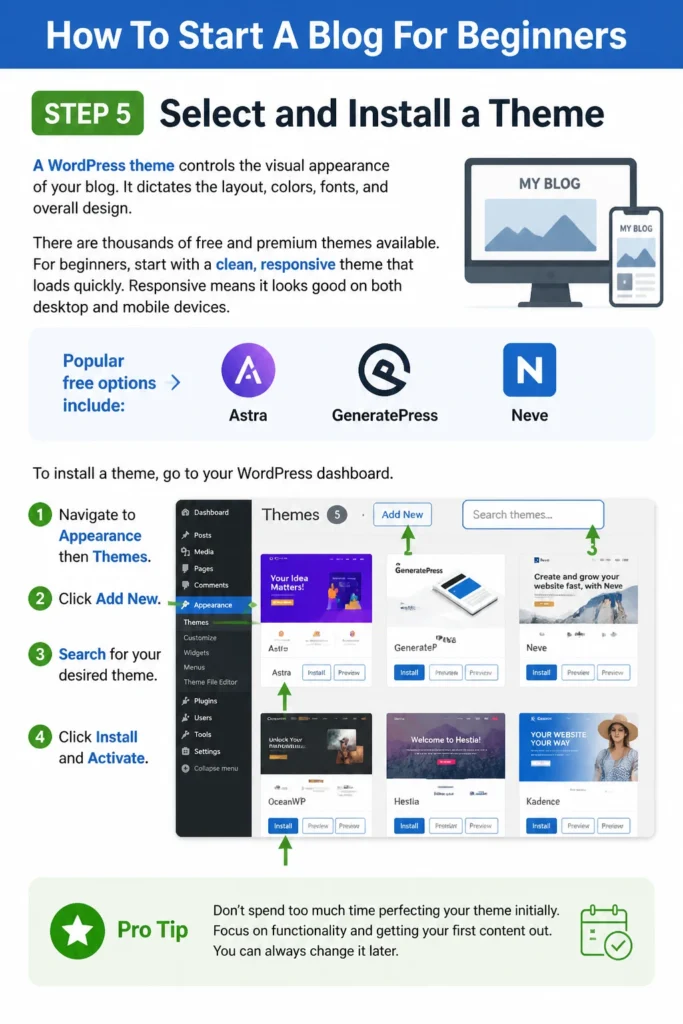
For beginners, start with a clean, responsive theme that loads quickly. Responsive means it looks good on both desktop and mobile devices. Popular free options include Astra, GeneratePress, and Neve.
To install a theme, go to your WordPress dashboard. Navigate to “Appearance” then “Themes.” Click “Add New,” search for your desired theme, and then click “Install” and “Activate.”
Pro Tip: Don’t spend too much time perfecting your theme initially. Focus on functionality and getting your first content out. You can always change it later.
Step 6: Install Essential Plugins
Plugins add extra features and functionality to your WordPress blog. They can improve security, optimize for search engines, and enhance user experience. Start with a few crucial ones.

Some must-have plugins include Yoast SEO or Rank Math for search engine optimization, Wordfence for security, and WP Super Cache or LiteSpeed Cache for performance. A contact form plugin like WPForms is also very useful.
To install a plugin, go to “Plugins” then “Add New” in your WordPress dashboard. Search for the plugin, click “Install Now,” and then “Activate.” Be careful not to install too many, as they can slow down your site.
Step 7: Create Your First Blog Post and Pages
Now for the exciting part: creating content! Go to “Posts” then “Add New” in your WordPress dashboard to write your first blog post. Give it a compelling title and start writing your article.

Remember to format your post with headings, short paragraphs, and images to make it easy to read. This improves engagement with your readers. Proofread carefully before publishing.
You’ll also need a few essential pages, like an “About Me” page and a “Contact” page. Go to “Pages” then “Add New” to create these. These pages help build trust and connect with your audience.
Step 8: Optimize for Search Engines (Basic SEO)
Even as a beginner, you can take simple steps to help people find your blog. This is called Search Engine Optimization (SEO). Start by installing an SEO plugin like Yoast SEO or Rank Math.
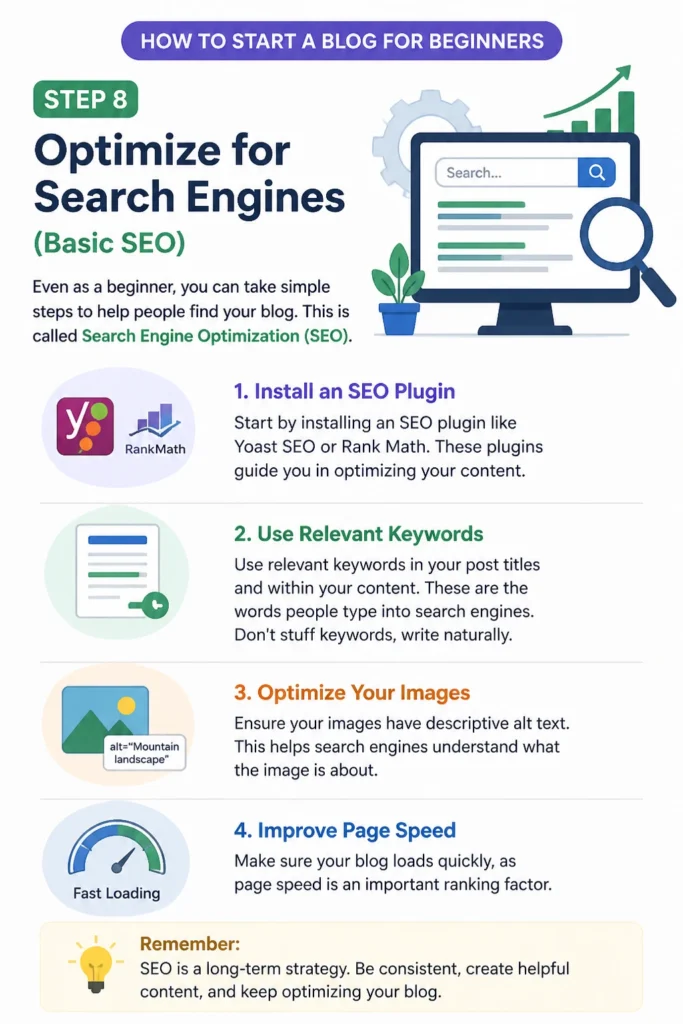
Use relevant keywords in your post titles and within your content. These are the words people type into search engines. Don’t stuff keywords, write naturally.
Ensure your images have descriptive alt text. This helps search engines understand what the image is about. Make sure your blog loads quickly, as page speed is an important ranking factor.
Step 9: Promote Your Blog
Once your blog is live and you have some content, it’s time to share it with the world. Don’t just wait for people to find you; actively promote your work. Social media is a great starting point.

Share your posts on platforms where your target audience hangs out. This could be Facebook, Instagram, Pinterest, Twitter, or LinkedIn. Engage with other users and participate in relevant communities.
Consider building an email list from day one. Offer something valuable in exchange for an email address, like a free guide. Email marketing is a powerful way to keep readers coming back.
Common Mistakes to Avoid
Not Having a Clear Niche
Many beginners start blogging about too many different topics. This makes it hard for readers to understand what your blog is about. It also makes it difficult to attract a loyal audience. Focus on one specific area that you are passionate and knowledgeable about. This helps you become an authority in that field.
Ignoring SEO from the Start
Some new bloggers focus only on writing without thinking about how people will find their content. While good writing is key, understanding basic SEO is vital. Spend a little time learning how to use keywords and format your posts for search engines. This small effort can make a big difference in visibility over time.
Inconsistent Publishing Schedule
Starting strong and then fading away is a common pitfall. Readers expect fresh content regularly. Decide on a realistic publishing schedule, whether it’s once a week or twice a month, and stick to it. Consistency builds an audience and keeps them coming back for more.
Over-Complicating the Design
It’s tempting to add all sorts of fancy widgets and animations to your blog. However, this often leads to slow loading times and a cluttered user experience. Keep your design clean, simple, and easy to navigate. Prioritize readability and speed over flashy aesthetics.
Troubleshooting
My Blog is Not Loading After Installation
If your blog isn’t appearing, first check your domain name spelling. Make sure it’s typed correctly in your browser. Next, log into your hosting account and verify that WordPress was installed successfully.
Sometimes, it takes a little time for DNS changes to propagate across the internet. This can take anywhere from a few minutes to a few hours. Clear your browser’s cache and try again, or try accessing your site from a different device or network. Contact your hosting provider’s support if the issue persists; they can quickly diagnose server-side problems.
I Can’t Log Into My WordPress Dashboard
This is a common issue, often related to forgotten passwords. First, try resetting your password using the “Lost your password?” link on the login page. This sends a reset link to the email associated with your WordPress admin account.
If that doesn’t work, or you don’t receive the email, your hosting provider can often help. They can reset your password directly through your cPanel or database. Double-check that you’re using the correct login URL, usually `yourdomain.com/wp-admin`.
My Images Are Not Displaying Correctly
Images that don’t show up or appear broken can be frustrating. First, ensure the image files themselves are not corrupted and are correctly uploaded to your WordPress media library. Check the file size; very large images can sometimes cause display issues or slow loading.
Next, verify that the image paths in your post or page are correct. If you recently migrated your site or changed your domain, image URLs might need updating. A plugin like Regenerate Thumbnails can help fix image sizing issues after a theme change.
Key Takeaways
- Define a clear niche to attract your ideal readers and maintain focus.
- Choose self-hosted WordPress.org for maximum control and flexibility.
- Secure reliable web hosting and a memorable domain name early on.
- Install a clean, responsive theme and essential plugins for functionality.
- Prioritize creating valuable, well-formatted content consistently.
- Implement basic SEO practices to help people discover your blog.
- Actively promote your content on social media and consider an email list.
Frequently Asked Questions
How much does it cost to start a blog?
The main costs are web hosting and a domain name. This typically ranges from $3 to $10 per month for beginners. Many hosts offer discounts for your first year. Premium themes or plugins can add to the cost, but you can start with free options.
How long does it take to see results from blogging?
Blogging for results is a marathon, not a sprint. It can take anywhere from 6 months to a year or more to build significant traffic and an audience. Consistency, quality content, and promotion are key factors. Don’t get discouraged if growth isn’t immediate.
Can I make money blogging?
Yes, many bloggers earn income through their sites. Common monetization methods include advertising, affiliate marketing, selling your own products or services, and sponsored content. It often takes time and a substantial audience to generate significant revenue.
Do I need to be a great writer to start a blog?
No, you don’t need to be a professional writer. What matters most is clear communication, passion for your topic, and a willingness to learn. Practice improves writing skills over time. Focus on providing value and connecting with your readers authentically.
Our Top Recommended Finds
- Ergonomic Keyboard: A comfortable keyboard can make hours of writing much more pleasant and prevent strain.
- Noise-Canceling Headphones: Block out distractions and focus deeply on your content creation without interruptions.
- Good Quality Desk Lamp: Proper lighting is essential for eye comfort during long writing sessions and can boost productivity.
Your Blogging Journey Begins Now
You now have a clear roadmap to launch your very own blog. This guide provides the practical steps, but the real magic happens when you start creating. Don’t wait for perfection; simply begin.
Think about your first blog post and what you want to share with the world. The internet is waiting for your voice. Take that initial leap and start building your online presence today.